
Entity Mode Artificial Inseminations are used to record the artificial inseminations of hens...
Prior to creating an Entity Mode Artificial Insemination transaction, the following must first be created:
The following sections are outlined in the Entity Mode Artificial Insemination document:
 button to create a new transaction.
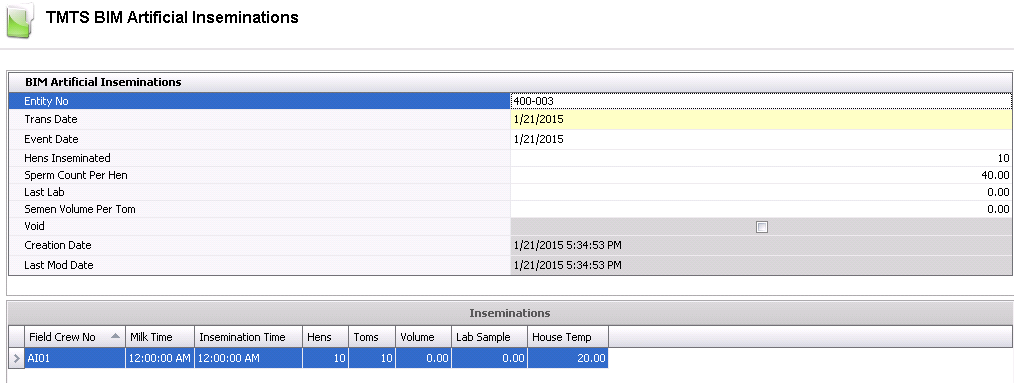
From Entity No, select the entity where the flock is located.
Trans Date displays the date of the transaction.
Event Date indicates the insemination date. Event Date will default to the transaction date and can be modified if required.
In the Hens Inseminated field, enter the number of hens required to be inseminated for the transaction date.
In the Sperm Count Per Hen field, enter the required sperm count for each hen.
In the Last Lab field, enter the semen concentration results of the most recent lab analysis so that the calculations may be performed. If there are previous transactions for the flock, the value will default from the most recent transaction.
In the Semen Volume Per Tom field, enter the expect volume of semen to be milked from each tom.
Selecting the Void flag will cancel the insemination transaction.
Creation Date indicates the date the transaction was created.
Last Mod Date indicates the date the transaction was last modified.
From Field Crew No, select the field crew that will be completing the insemination.
In the Milk Time field, enter the time that the semen was milked from the tom.
In the Insemination Time field, enter the time the insemination took place.
Enter the number of Hens to be inseminated for the selected flock.
Enter the number of Toms utilized.
Enter the Volume of diluted semen used for insemination.
In the Lab Sample field, enter the semen concentration for the lab sample as tested.
In the House Temp field, enter the temperature of the house. This value may be entered in Fahrenheit or Celsius depending on the unot of measure utilized by the division.
The posting process places the transaction in `Posted` status. This prevents the transaction from being modified and records the data to the Flock Master.
 in the top menu bar and select 'Post'.