HPA Availability Details

There are several options available within the Product Availability
view to the data. The following document outlines each of these schedules.
To access the options:
- Click on the required projection week in Weekly
- Right-click to select option
Projection Details
The Projection Details outline the data the is used to calculate the
values. There are three options available in Projection Details:
Supply Details
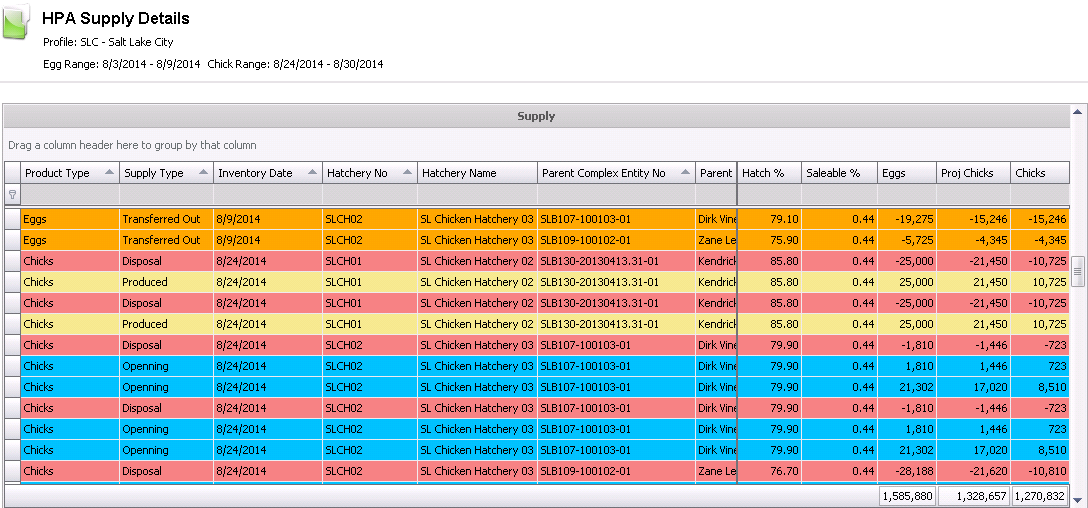
The Supply Details display the data that is used to determine the eggs
and chicks supply for the selected date range.
- Click on the required projection week in Weekly
- Right-click to select Projection Details>Supply
Details.
- The projection will be displayed in a variety
of colors. The following is a summary of the color grid.
| Opening Inventory |
Disposal |
| Eggs Produced |
Transfer In |
| Chicks Produced |
Transfer Out |
- Product Type
indicates if the product is egg or chick.
- Supply Type
indicates the type of supply. Field will be displayed as Opening,
Produced, Purchases,Disposal, Transferred In, Transferred Out.
- Inventory Date
represents the date of the product. Egg products will display the
egg inventory date of the supply. Chicks will display the chick inventory
date of the supply.
- Hatchery No
and Hatchery Name indicate
the hatchery for the supply record.
- Parent Complex
Entity No identifies the entity that is sourcing the product.
- Parent Farm Name
displays the farm name of the source parent entity.
- Breed No
and Breed Name display the
breed of the source parent entity.
- Generation
indicates the generation of the source parent entity.
- Egg Age
represents the difference from the date that the eggs were produced
until the eggs were set or sold.
- Flock Age
is the age of the entity when the eggs were produced.
- Tracking No
will be displayed as the actual tracking number if the eggs have been
received in inventory. If the eggs are projected to be received, the
system will automatically generate a sequential tracking number.
- Production Date
represents the date that the eggs were produced if in inventory or
projected date of production if eggs are being projected.
- Set Date
will be displayed if the eggs have been set or planned to be set on
a specified date. If the eggs do not have a set date, the value will
be displayed as 11/30/1899.
- Transfer Date
will be displayed if the eggs have been transferred or planned to
be transferred on a specified date. The Transfer Date will be calculated
for projected transfers based on the number of days defined in Registry>Hatcheries>Setter
Transfer>Transfer Days. If the eggs do not have a set date,
the value will be displayed as 11/30/1899.
- Hatch Date
will be displayed if the eggs have been set or planned to be set on
a specified date. The Set Date will be calculated for projected hatches
based on the number of days defined in Registry>Hatcheries>Eggs
Set>Incubation Days. If the eggs do not have a set date,
the value will be displayed as 11/30/1899.
- Hatch Category
No and Hatch Category Name
will be displayed for chicks hatched or projected to be hatched within
the projection date range. The categories will be displayed as the
values defined in Admin>Business>Poultry>HIM>Hatch
Categories.
- The Sex No
will be displayed as defined in Admin>Business>Poultry>HIM>Hatch
Categories.
- The Complex PO
No will be populated if the product is being purchased.
- Chick Supply
indicates that the detail line is part of the chick supply on the
Weekly grid. This is only used to filter and sort the data.
- Egg Value,
Chick Value and Chick
Sellable Value are currently not used and are for future development.
- Hatch %
represents the actual or projected hatch percentage for the selected
product line.
- Saleable %
is the actual or projected saleable percentage for the selected product
line.
- Eggs are
the number of eggs available.
- Proj Chicks
are the number of projected chicks based on the Hatch %: Eggs
x Hatch %
- Chicks
is the saleable quantity of chicks. This number will be the same as
Proj Chicks in many instances. The calculation is identified below
depending on the generation.
| Generation |
Primary
Sex on Breed |
Sex
Calculating for |
Formula |
| All |
All |
Straight
Run |
Eggs
× Hatch % |
| All |
Straight
Run |
Female |
Eggs
× Hatch % x Female % |
| Parent/Layer |
Female/Male |
|
| All |
Straight
Run |
Male |
Eggs
× Hatch % × (1 - Female %) |
| Parent/Layer |
Female/Male |
|
| Non-Parent/Layer |
Female |
Female |
Eggs × Sale % |
| Male |
Male |
| Female |
Male |
Eggs x (Hatch % - Sales
%) |
| Male |
Female |
Utilization Details
The
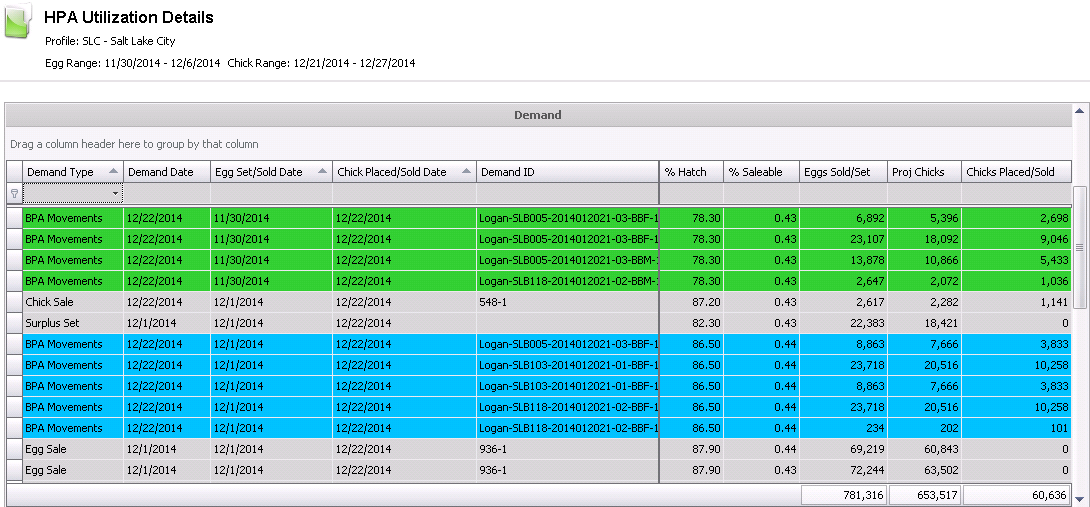
Utilization Details screen provides an outline of how the product
is utilized by Demand Type (Chick Sales, BRPA Placement and Egg Sales).
The view also displays Demand Short, Cross Utilized or Cross Utilized
Held Over.
Click
on the required projection week in Weekly
Right-click
to select Projection Details>Utilization Details.
The
projection will be displayed in a variety of colors. The following
is a summary of the color grid.
Cross Utilized |
System
Generated Demand |
Cross Utilized
(Held Over) |
Demand Short |
Modified by
User |
N/A |
- Demand Type
represents when the usage requirement is sourced. Field will be displayed
as BPA Movements, BRPA Movements, Chick Sale, Egg Sale or Surplus
Set.
- Demand Date
indicates the date that the product is required to be utilized. The
demand date will be used for both eggs and chicks.
- Egg Set/Sold
Date is used to indicate the date that the eggs are utilized
for set or sale. The set date will be calculated based on the number
of incubation days as defined in Registry>Hatcheries>Eggs
Set>Incubation Days.
- Chicks
Placed/Sold Date represents the date that the chicks
were sold or placed.
- Demand
ID indicates the where the demand is being created. The
Demand ID will be a destination entity/product/demand date or sales
order number.
- Destination
Name will be displayed as the customer name or the entity
that the product is being placed.
- Product
No is the product that is being sold, set or placed.
- Product
Type indicates if the demand product is egg or animal.
- Animal
Type indicates the type of demand product. Values will
be displayed as Breeder Female, Breeder Male, Broiler Female, Broiler
Male, Eggs.
- Species
Type is the species for the demand. Value will be displayed
as chicken or turkey.
- Primary
Breed No represents the primary breed defined in the
demand product.
- Primary
Breed flag will be selected if the primary breeder is
being utilized. If the primary breed is not being utilized, the flag
will not be selected.
- Target
Age is the target processing date in days. The Target
Age is defined in the product or in the BPA/BRPA movements
- Deliver
To Zip and Deliver To Country
are derived from the delivery customer assigned to the sales order.
Note that this is not the ship-to customer.
- Hatchery
No and Hatchery Name
represent the hatchery that is sourcing the product.
- Parent
Complex Entity No indicates the entity that is producing the
product for utilization.
- Parent
Farm Name is the farm that will be producing the product for
utilization.
- Breed
No identifies the breed of the entity that will be producing
the product for utilization.
- Generation
indicates the generation of the entity that will be producing the
product for utilization.
- Flock
Age represents the age of the entity when the eggs are produced.
Note that the Flock Age will not be displayed for projected BPA entities
that are not posted.
- Egg
Age is the number of days from production to set or sale.
- Production
Date represents the date that the eggs were produced if in
inventory or projected date of production if eggs are being projected.
- Set Date
will be displayed if the eggs have been set or planned to be set on
a specified date. If the eggs do not have a set date, the value will
be displayed as 11/30/1899.
- Transfer Date
will be displayed if the eggs have been transferred or planned to
be transferred on a specified date. The Transfer Date will be calculated
for projected transfers based on the number of days defined in Registry>Hatcheries>Setter
Transfer>Transfer Days. If the eggs do not have a set date,
the value will be displayed as 11/30/1899.
- Hatch Date
will be displayed if the eggs have been set or planned to be set on
a specified date. The Set Date will be calculated for projected hatches
based on the number of days defined in Registry>Hatcheries>Eggs
Set>Incubation Days. If the eggs do not have a set date,
the value will be displayed as 11/30/1899.
- Hatch Category
Type will be displayed for chicks hatched or projected to be
hatched within the projection date range. The categories will be displayed
as the values defined in Admin>Business>Poultry>HIM>Hatch
Categories.
- The Sex No
will be displayed as defined in Admin>Business>Poultry>HIM>Hatch
Categories.
- Processing Sequence
indicates the sequence that the external orders will be processed.
The Processing Sequence is set in General>Sales>Orders.
- Demand Short
will be selected if there is not enough product to supply the placement
or order. This field can be filtered to determine where demand issues
are indicated.
- Cross Utilized
will be selected if the product is being source based on the utilization
of another order. For example, there is an order for 20,000 females
which is considered in the utilization. The hatch will have both females
and males, therefore the males that are hatch and assigned to orders
or placements are considered as cross utilized.
- Cross Utilized
Held Over indicates that the cross utilized birds are being
held over to supply another order or placement.
- Held Over Days
indicates the number of days that the birds are held over to placement
or shipment.
- Hatch %
represents the actual or projected hatch percentage for the selected
product line.
- Saleable %
is the actual or projected saleable percentage for the selected product
line.
- Eggs Set/Sold
are the number of eggs that are required for the utilization of eggs
or chicks..
- Proj Chicks
are the number of projected chicks based on the Hatch %: Eggs
x Hatch %
- Chicks
Placed/Sold are the number of chicks utilized for the
placement or order.
Inventory Details
Inventory Details
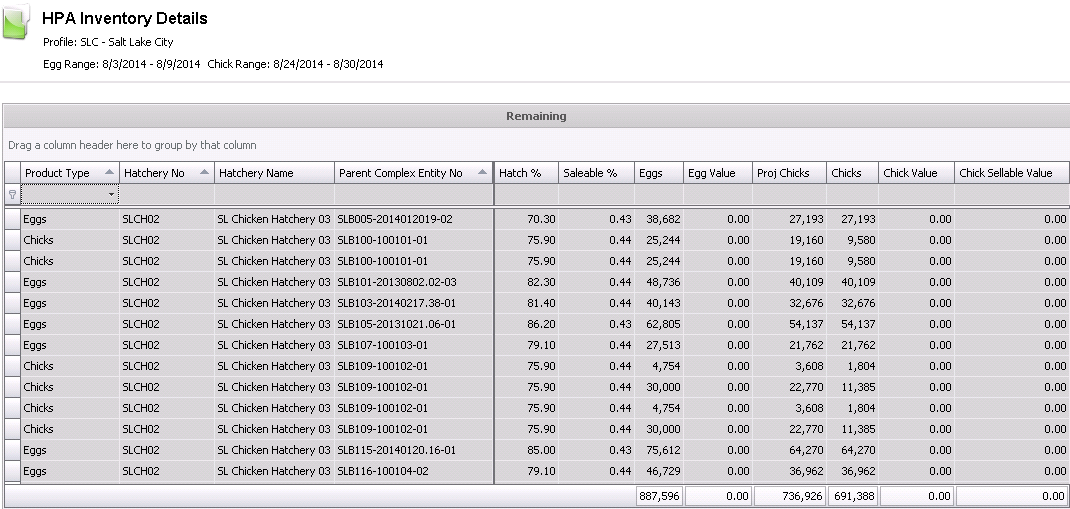
identifies the remaining egg left in inventory. The screen
can be viewed as eggs or chicks by filtering the Product Type.
- Click on the required projection week in Weekly
- Right-click to select Projection Details>Inventory
Details.
- Product Type indicates if the inventor y is Eggs
or Chicks. Use this field to filter the data for eggs or chicks.
- Hatchery No
and Hatchery Name represent
the hatchery where the inventory exists.
- Parent
Complex Entity No indicates the entity that is producing the
inventory.
- Parent
Farm Name is the farm that will be producing the inventory
product.
- Breed
No and Breed Name identify
the breed of the entity that will be producing the inventory.
- Generation
indicates the generation of the entity that will be producing the
product for utilization.
- Flock
Age represents the age of the entity when the eggs are produced.
Note that the Flock Age will not be displayed for projected BPA entities
that are not posted.
- Egg
Age is the number of days from production to inventory date.
- Tracking
No will be displayed if the eggs have been received in inventory.
If the eggs are projected, there will be no Tracking No assigned.
- Production
Date represents the date that the eggs were produced if in
inventory or projected date of production if eggs are being projected.
- Set Date
will be displayed if the eggs have been set or planned to be set on
a specified date. If the eggs do not have a set date, the value will
be displayed as 11/30/1899.
- Transfer Date
will be displayed if the eggs have been transferred or planned to
be transferred on a specified date. The Transfer Date will be calculated
for projected transfers based on the number of days defined in Registry>Hatcheries>Setter
Transfer>Transfer Days. If the eggs do not have a set date,
the value will be displayed as 11/30/1899.
- Hatch Date
will be displayed if the eggs have been set or planned to be set on
a specified date. The Set Date will be calculated for projected hatches
based on the number of days defined in Registry>Hatcheries>Eggs
Set>Incubation Days. If the eggs do not have a set date,
the value will be displayed as 11/30/1899.
- Hatch Category
No and Hatch Category Name
will be displayed for the chick inventory. The categories will be
displayed as the values defined in Admin>Business>Poultry>HIM>Hatch
Categories.
- Category Type
is associated with Hatch Category No as defined in Admin>Business>Poultry>HIM>Hatch
Categories.
- The Sex No
will be displayed as defined in Admin>Business>Poultry>HIM>Hatch
Categories.
- The Complex PO
No will be populated if the product is being purchased.
- Hatch %
represents the actual or projected hatch percentage for the selected
inventory detail.
- Saleable %
is the actual or projected saleable percentage for the selected inventory
detail line.
- Eggs are
the number of eggs available.
- Proj Chicks
are the number of projected chicks based on the Hatch %: Eggs
x Hatch %
- Chicks
is the saleable quantity of chicks. This number will be the same as
Proj Chicks in many instances. The calculation is identified below
depending on the generation.
| Generation |
Primary
Sex on Breed |
Sex
Calculating for |
Formula |
| All |
All |
Straight
Run |
Eggs
× Hatch % |
| All |
Straight
Run |
Female |
Eggs
× Hatch % x Female % |
| Parent/Layer |
Female/Male |
|
| All |
Straight
Run |
Male |
Eggs
× Hatch % × (1 - Female %)
|
| Parent/Layer |
Female/Male |
|
| Non-Parent/Layer |
Female |
Female |
Eggs × Sale %
|
| Male |
Male |
| Female |
Male |
Eggs × (Hatch % -
Sale %) |
| Male |
Female |
- Egg Value,
Chick Value and Chick
Sellable Value are currently not used and are for future development.
Transactions
The Transactions
details represent the actual transactions that exist within the system
for supply and demand. The following transactions are available:
Orders
The Orders transactions indicate the orders that relate to the selected
week.
- Click on
the required projection week in Weekly
Right-click
to select Transactions>Orders.
The
screen will display the orders for the selected projection week.
Double-click
or right-click and select Edit to view the order.

BRPA Placements
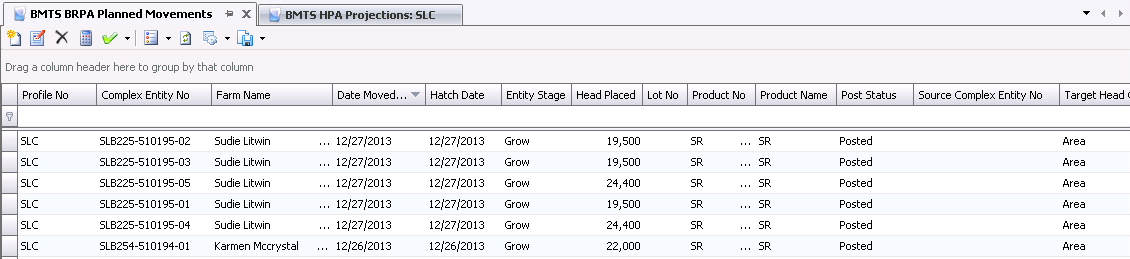
The BRPA Placement transactions indicate the BRPA movements for placements
that relate to the selected week. This data will only be displayed if
the HPA Profile>Demand>Profiles>Source
Info is set to Movements or Both.
- Click on
the required projection week in Weekly
Right-click
to select Transactions>BRPA Movements.
The
screen will display the placements for the selected projection week.
Double-click
or right-click and select Edit to view the BRPA Movements calendar.
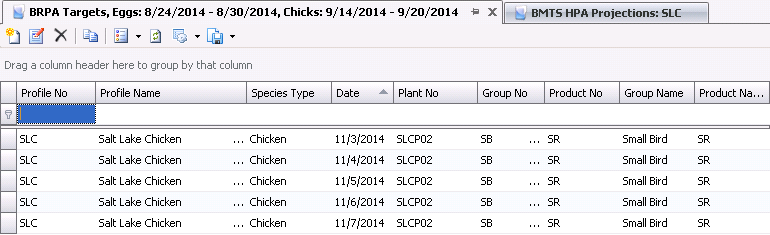
BRPA Targets
The BRPA Targets transactions indicate the BRPA target requirements
that relate to the selected week. This data will only be displayed if
the HPA Profile>Demand>Profiles>Source
Info is set to Targets or Both.
- Click on
the required projection week in Weekly
Right-click
to select Transactions>BRPA Targets.
The
screen will display the placements for the selected projection week.
Double-click
or right-click and select Edit to view the BRPA Targets calendar.
BPA Placements
The BPA Placements transactions indicate the BPA placement movements
that relate to the selected week.
- Click on
the required projection week in Weekly
Right-click
to select Transactions>BPA Movements.
The
screen will display the placements for the selected projection week.
Double-click
or right-click and select Edit to view the BPA Movements calendar.
