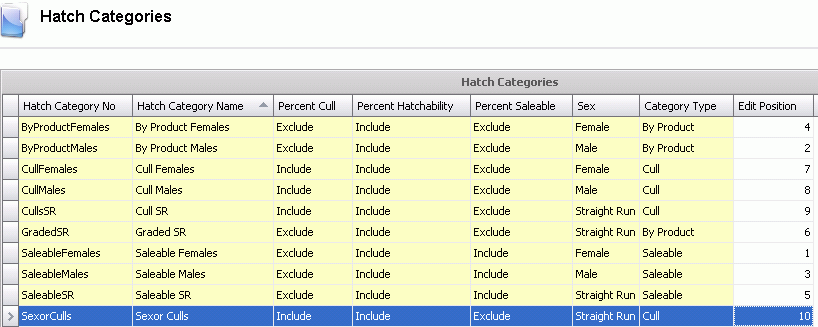
Hatch Categories are use in Chick Hatched to represent the different types of hatch categories. Standard categories are defined in the system, however additional categories can be added as required. The existing categories can be modified if necessary. The hatch categories can be set to be included or excluded from the hatchability, saleability and cull calculations.
In Admin>Business>Poultry>HIM, select Hatch Categories.
Select  to
create a new record.
to
create a new record.
Enter the Hatch Category No to identify the category the chick will be used for.
Enter a Hatch Category Name to describe the hatch category.
Select Percent Cull if the category is to be used to calculate cull percentage select include. If not used to calculated cull percent, select `Exclude`.
Select Percent Hatchability if the category is to be used to calculate hatch percentage select include. If not used to calculated hatch percent, select `Exclude`.
Select Percent Saleable if category is to be used to calculate saleable percentage select include. If not used to calculated saleable percent, select `Exclude`.
Select the Sex of the hatch category. Available options are: Female, Male and Straight Run.
Select the Category Type. Available options are: Saleable, By Product and Cull.
Enter the Edit Position to indicate the position the columns will be aligned on in the chicks hatched screen.
Save and Close the record.