silo transfers

Silo transfer transactions are used to transfer ingredients or feed
from silo to silo within the same mill. The silo can be either a production
or non-production silo. As the transaction occurs within the same mill,
the global post will adjust both silos to actual cost.
Prior to creating an Ingredients Silo Transfers transaction, the following
items must be created:
Create
a Silo Transfer
- In FMIM>Transactions>Feed
Production, select Silo
Transfers.
- In the Silo Transfers main index, click
 to create a new record .
- In the New Record dialog box, in the Trans
Date/Time field, enter the date and time of the transaction.
- Select the Feed
Mill No will feed will be transferred.
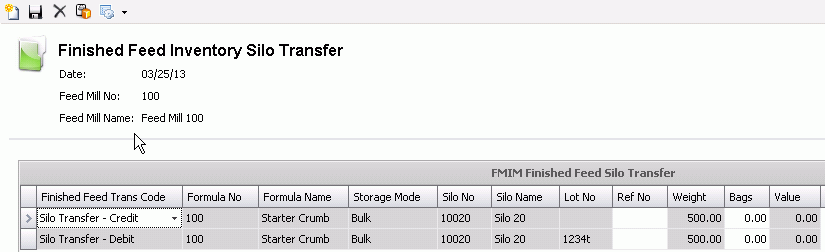
A new Finished Feed Silo Inventory Transfer
Screen will appear.
- Select
to create a new Silo Transfer transaction.
The Silo Transfer for Finished Feed Inventory
screen will appear.
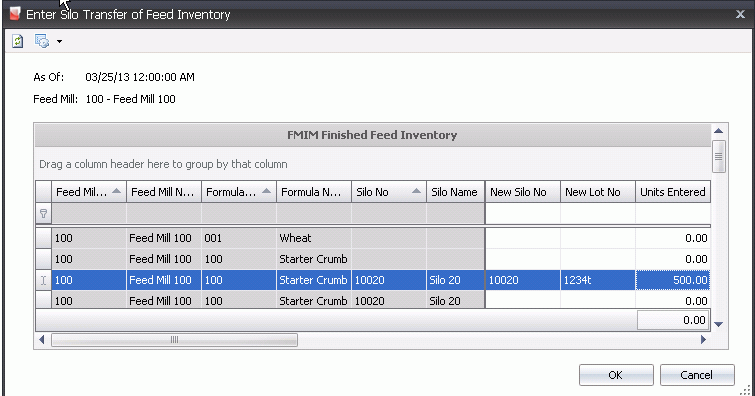
- New Silo is
an optional field used to store the feed inventory silo number.
- New Lot No
is an optional field used to store the lot number for the transfer
transaction.
- Enter the number of Units
being transferred.
- Click 'OK'.
- A Debit and Credit transaction will appear for
the ingredients being transferred.