Carriers

Carriers are used in Sales>Orders
to determine the transportation requirements for the order. Vendors can
be optionally assigned to the carrier. Once carriers are created, the
carrier can be assigned to the Sales>Orders>Transportation Details.
Table Name: ProteinCarriers
Carriers are used in:
Create Carrier
- In Admin>Business>General>Definitions,
select Carriers.
- Select
 to
create a new carrier.
to
create a new carrier.
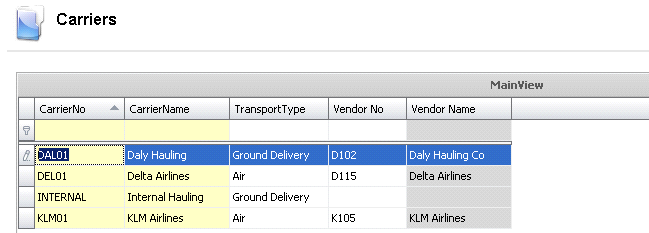
- Enter a code to define the Carrier
No. (alphanumeric, maximum 20 characters)
- Enter a Carrier
Name to describe the carrier. (alphanumeric, maximum 50 characters)
- Select the Transport
Type for the carrier. Options are Air, Ground Delivery, Ground
Pickup, Rail and Water.
- Optionally a Vendor
No can be assigned to the carrier.
- The Vendor Name
is derived based on the selected vendor.