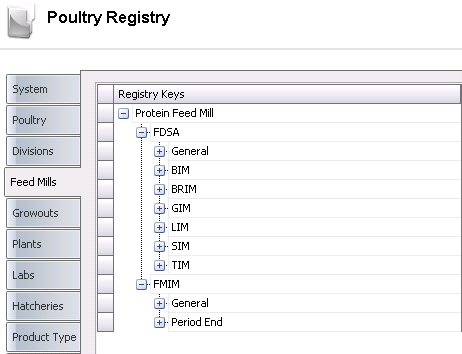
The Feed Mills tab of the registry contains numerous components related to the different types of feed mills:
The FDSA section contains registry settings for use in the different feed mills.
 .
.Bin Adjustment Safety Factor modifies the bin capacity used for feed delivery calculations to minimize the delivery of too much feed to one bin.
Bin Capacity Mode uses the bin capacity based on the combination between the sex defined for each bin and the sex on the feed type that it is projecting. Available options are:
Non Sex - instructs the FDSA to use the bin capacity for all active bins at the time.
Sex Definition - instructs the FDSA to use the bin capacity for all active bins at the time based on the sex type defined on each bin.
Bin Delivery Mode is used to select the projection house bin capacity utilization. Available options are:
Alternate Four Bins - instructs the FDSA to alternate bins for each feed delivery. Option will limit a delivery amount to the capacity of the following bin.
Always Alternate - instructs the FDSA to alternate bins for each feed delivery. Option will limit a delivery amount to the capacity of the opposite bin. Example: if the last delivery was to Bin 1, the next delivery will be to Bin 1, and vice versa.
First Bin Except First Delivery - delivers all feed to Bin A, except when an F Flag (First Delivery/Feed Type) is present
House Capacity - instructs the FDSA to maximize usage of bin capacities by utilizing both bins for a single delivery. Utilization of both bins is true for all deliveries with the exception of the first delivery of each feed type.
House Capacity Mixed Feed Types - the same as `House Capacity` except that it allows for different feed types to be mixed in one bin.
House Even Bin Ending Inventory - instructs the FDSA to balance all bin ending inventories. Mixed feed types are allowed in a single bin.
Compartment Rounding is used to enter the rounding factor for calculating `rounded` load amounts. Example: 3000 loads down to the nearest 3,000 LBS (KGS)
Feed Rounding Direction identifies the rounding direction. Available options are:
Round Combination - indicates to the program to round Up or Down the feed amount during the projection.
Round Down - indicates to the program to round Down the feed amount during the projection.
Round Up - indicates to the program to round Up the feed amount during the projection.
Feed Type Rounding Mode determines the rounding methodology used. If a feed delivery should consist of 12,000 lbs of which 3,000 lbs should Starter and 9,000 lbs should be Grower, Next Feed Type Mode determines which type of feed will be specified. Available options are: Advance To Next Feed Type, Extend Previous Type or Precise Feed Type Amounts.
Formula Assignment Effective Date Mode indicates the effective date moe of the formula assignment. Available options are:
Date Of Birth - this will link the entity being projected to the Formula Assignment Effective Date, based on the date of the birth of the Entity.
Projection Date - this will link the entity being projected to the Formula Assignment Effective Date, based on the projection date specified.
If the Harvest Date Delivery flag is selected, FDSA will schedule feed (if needed) on harvest date.
If the Limit Projection To Truck Capacity flag is selected, this will limit projected delivery amounts to the capacity of a single truck.
Load Compartment Rounding is used to enter the rounding factor for new loads. Example: 1,000 loads to the nearest 1,000 lbs.
Min Head Count For Rounding is used to enter the minimum head count before projection applies any amount rounding.
Min Percent Delivery is calculated from the percent of `Compartment Rounding`. Values are entered in percentages.
Next Feed Type Mode indicates the method for determining the feed type. Available options are:
Feed Program - will schedule feed type based on the program defined.
Stay on Previous Feed Type - will continue to use the previous feed type until the feed program changes feed types or a new feed type is delivered.
Projection Granularity Mode specifies the flock number format and the lowest level of data granularity tracked by the FDSA. Available options are: Entity, House or Pen.
Projection Mode is used to select the projection mode. Available options are:
Farm - allows for the projecting of all houses on a farm as a single unit. Each house will be analyzed for delivery requirements, yet a single projection record for the farm, identified as house `F`, will be displayed.
Farm House - projection will suggest a single delivery date for all houses on a farm based on the house with the lowest days to empty (or the house that will need feed first). A four house farm would have a single projected `next delivery` date with specific amounts projected to each house based on bin capacity as of the common delivery date.
House Independent - projection will suggest different delivery dates for each house based on independent house inventories (days to empty).
Rounding Dates Prior To Harvest is used to enter the number of days prior to harvest date where FDSA will no longer use `Compartment Rounding`.
Selecting the Split Projected Orders flag will split a projected order based on the truck capacity; otherwise it will create the order with the total projected amount.
Standard House Delivery is used to enter the standard house delivery amount, which is used in the projection to limit the amount of feed delivered to a house. This number will not overwrite the bin capacity.
Standard Truck Capacity is used to enter the maximum standard truck capacity.
System Delivery Rounding is used to enter the rounding factor for calculating `rounded` amounts when no compartment or feed job roundings are defined.
The section for each modules contains registry keys used in their respective planning options. *Note: The parameters for each module are the same.
Days Before Placement is used to enter the number of days to schedule delivery prior to date placed.
The FMIM section contains registry settings related to feed.
.Actual Adjustment Variance Mode determines what happens with the finished feed production variance incurred at the mill. It is either allocated to current period or it remains at the mill in a variance account. Available options are Excluded and Inventory.
Feed Formula Ingredient Breakdown Percent Rounding is used to enter the tolerance percentage, which is used to round the ingredient formulation to 100% on imported feed production transactions. An adjustment will be made to the ingredient with the highest usage percentage on the transaction.
Feed Formula Version Mode is used to select the mode for new formula versions. Available options are Unique or Unique By Date.
Feed Order Planning Date Validation is used to select the validation for the feed order planning date. Available options are:
Not Validated - all dates are modified with no restrictions. Dates are not considered dependent on other dates.
Validated - production and load dates are restricted by defined earliest and latest delivery dates.
If the Feed Trans Auto Reference No flag is selected, it instructs the program to generate the next sequential number. Reference number field will be read-only.
Formula Master Ingredient Usage Mode is used to select the mode to enter the ingredient breakdown in feed formula versions. Available options are Amount or Percent.
Feed Production Version Selection is used to select the mode to enter the formula version on feed selection records. Available options are Automatic Selection or Manual Selection.
Ingredient Receiving Auto Allocate Net Mode has three available options:
Auto - net weight will be distributed over multiple detail lines automatically.
Manual - net weight will not be distributed but will be entered manually over multiple detail lines.
Prompt - user will be prompted whether or not to distribute a new net value over multiple detail lines.
Ingredient Receiving Date Mode is used to select the mode to raw material transaction dates. Available options are Automatic Selection or Current Selection.
Inventory Cost Mode is used to determine inventory valuations, which can be determined using either `True FIFO` (First-In First-Out) or `Average Cost Basis` valuation/cost tracking.
Inventory Time Mode is used to determine the time mode. If Date Time is selected, the program will expect times entered for all transactions, and physical inventories will be taken a specific time. Available options are Date Only or Date Time.
Shrink Variance Mode is used to allocate the shrink adjustment to the feed formula costs or variance account for the period. Available options are:
Excluded - this mode determines the period cost of the feed formula before the shrink adjustment.
Inventory - this mode will allocate the shrink adjustment to the feed formula costs for the period.
Selecting the Unposted Product Cost Estimated Calculation flag will estimate ingredient and feed costs at the time of record creation, before global post, by calculating the current average inventory cost in the system. If the flag is not selected, the system will use a cost of zero before posting.
If the Validate Compound Formula Percent flag is selected, FMIM will validate that compound formulas equal 100% (Base formula + Additive).
Variance Account Mode determines if the variance account will be allocated to the ingredient costs for the period for average cost valuations. Available options are Excluded or Inventory.
FMIM OPS Allocation Mode determines if the system will process OPS allocations as a single aggregate value for OPS balance into all feed produced by each feed mill, or by account for each feed type or feed formula.
Global Post Price Generation is used to specify whether or not, and on what date to automatically generate ingredient and feed formula price records during the global price. if a price record exists with the specified date, the price will be overwritten with a new price. Add-ons will be copied from the most recent price record prior to the date for new records, or not changed if the record does not exist. Available options are: Current Period, Next Period or No Generation.
Global Post Mode determines the frequency of the shrink value calculations - weekly, monthly or dual. In dual modes, intermediate weekly values are obtained prior to month-end, and then at month-end, shrink is restated to a monthly basis. Available options are: Daily, Daily/Monthly, Daily/Weekly, Monthly, Weekly, Monthly/Weekly.
Physical Inventory Zero Default determines the default behavior when a physical inventory is not entered for an inventory item. Available options are:
Actual Physical Inventories Only - process only actual physical inventories