Inventory By Farm

The Inventory By Farm screen shows all feed inventory according to the
farm selected.
View Feed Inventory by Farm
- In LMTS>LIM>Transactions>Feed
Inventories, select Inventory
By Farm.
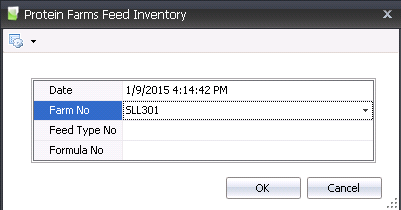
- In the Date
field, enter the date of the inventory to be viewed.
- From Farm No,
select the farm where the inventory is located.
- The Feed Type
No can be selected if required.
- Optionally, the Formula
No can also be selected.
- Click 'OK' and the inventory for the selected
entity will appear.
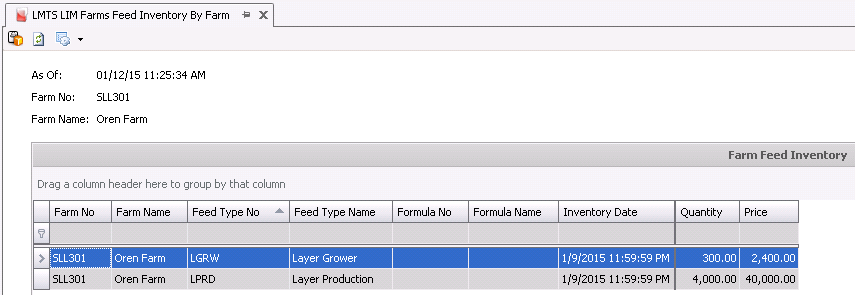
- Farm No
identifies the farm where the inventory is located.
- Farm Name
displays the name of the farm.
- Feed Type No
identifies the type of feed in inventory.
- Feed Type Name
displays a description of the feed product.
- Formula No
identifies the feed formula.
- Formula Name
displays a description of the formula.
- Inventory Date
indicates the date inventory was last taken.
- Quantity
represents the total quantity of units in inventory.
- Price
displays the total price for the feed in inventory.