
The Setters Reconciliation view provides the details for all of the setter transactions in a specified period in order to determine the valuation. All transactions that relate to the egg set product will be listed in the inventory reconciliation to determine the quantity and valuation of the product. The transactions will be valued based on FIFO or Average Cost as defined in the mill registry.
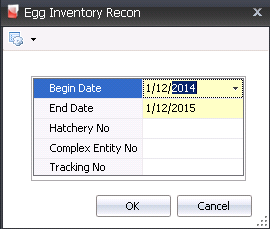
The reconciliation can be run for a specified date range, hatchery and Complex Entity No. Once the data is generated, the screen can be filtered and grouped as required to view more specific data.

Record Type indicates the source of the inventory detail. Available options are: Received, Usage or Physical.
Egg Product No identifies the egg product utilized for the transaction.
Tracking No displays a unique reference number used to identify the group of eggs in the transaction.
Production Date displays the date that the eggs were produced, to determine egg age.
Set Date displays the date the eggs were set to hatch.
Received Date indicates the date the eggs were received at the hatchery.
Transfer Date displays the date that the eggs were transferred from the setter to the hatcher.
Buggy No identifies the buggy on which the eggs were placed, if applicable.
Setter Name displays a description of the setter.

Hatcher No identifies the hatcher in which the eggs were set to hatch.
Hatcher Reject No identifies the reason the eggs were rejected or removed from the hatcher.
Quantity displays the number of set eggs utilized for the transaction.
Source Quantity displays the original amount of eggs that were received or purchased.
Source Remaining Quantity displays the amount of inventory remaining from the original transaction.
Source Date displays the date the original transaction occurred.
The Consignment flag will be selected if the eggs were purchased using a Consignment Purchase Order.
The fields described above are the typical fields used to analyze the inventory reconciliation data. The following fields are also available depending on the type of transaction that is being reviewed.
|
|
|
|
|
|
|
|
|
|
|
|
|
|
|
|
|
|