
Repack transactions are used to transfer bulk ingredient to a different package type, such as bagged feed. The process will create a credit adjustment for the bulk feed formula and a debit adjustment for the bagged formula. Global post will value the transaction at the actual value.
In FMIM>Transactions>Feed Production, select Repack.
In the Finished Feed Inventory Repack Screen,
click on the  button to create a new record.
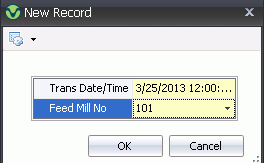
Enter the Trans Date/Time of the transaction. Time is optional and will default to 12:00 midnight.
Select the Feed Mill No creating the Rework.
Click the OK button and a new inventory repack screen will appear.
Click on the button to
create a new transaction. The Select the Formulas to Repack dialog
box will open.
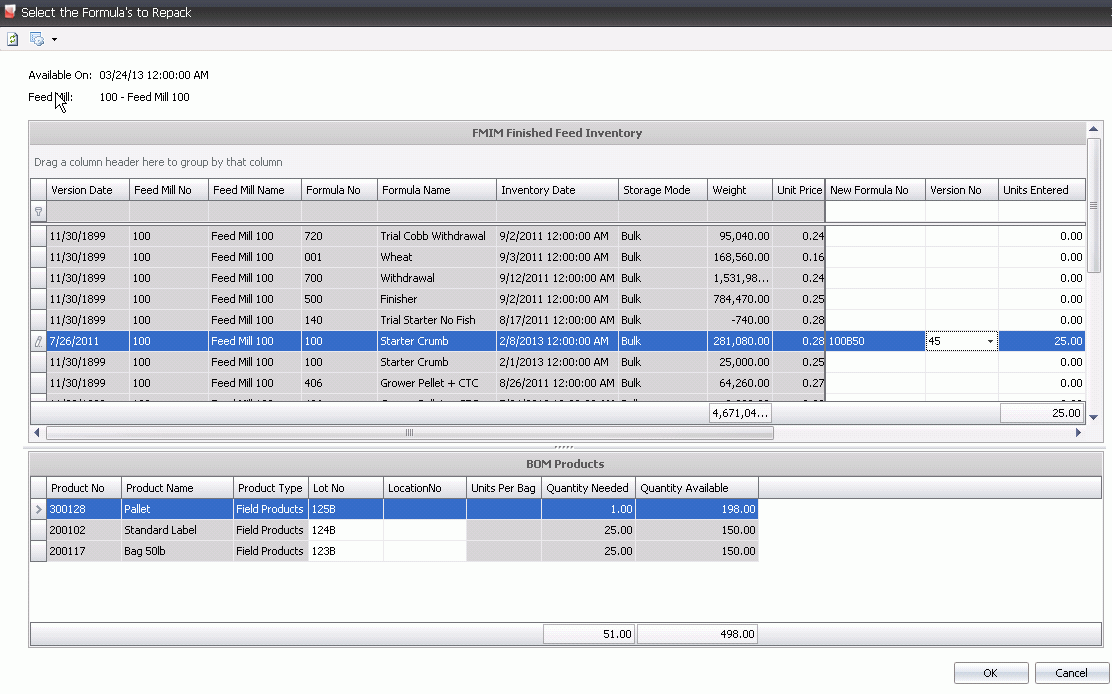
Select the New Formula No to redefines the formula as bags instead of bulk.
Select the Version No of the feed being repacked.
In the Units Entered field, enter the number of bags to be repacked.
All other fields are derived from Finished Feed Inventory.
In the BOM Products section, select the Lot No if lot numbering is used. The field represents the lot number for the product received. The cost will be adjusted from that lot number. If Lot No is entered incorrectly Quantity Available will be 0 and a error message will appear when click on OK.
Location No is an optional field and is used to store the bags in a specific location as defined in silos.
Click the OK button and a Debit and Credit
transaction will appear for the Repack transaction.
