
Ingredient Transaction Reconciliation


Transaction Reconciliation screen is  view only. Transaction reconciles where the cost of a specific transaction is derived based on the transaction details entered in the system. The screen is viewed based upon a beginning and ending date as well as Feed Mill and Product. Each transaction that affects the inventory will be displayed.
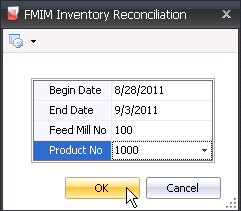
Generate Ingredient Transaction Reconciliation

  1. In FMTS>FMIM>Transaction Reconciliation, select Ingredients.


  2. Enter the required date range in the Begin Date and End Date fields. The period is usually a global post period, but can be defined for any date range.
  3. Optionally, the Feed Mill No can be entered to filter the reconciliation data for a specified mill.
  4. The Product No can be selected if the reconciliation data is being generated for a specified product.
  5. Click the OK button and the Ingredient Reconciliation data will load based on the selected criteria.
  6.  


  7. Record Type indicates the source of the inventory detail. Options will be one of Received, Usage or Physical.
  8. Trans Code determines the transaction type for the inventory record detail.
  9.  

    Record Type Trans Code
    Received
    • Beginning Inventory
    • Production
    • Receiving
    • Rework Receiving
    • Silo Transfer - Credit
    • Silo Transfer - Debit
    • Transfer In
    • Transfer Out
    • Zero Quantity Adjustment - Credit
    • Zero Quantity Adjustment - Credit
    Usage
    • Disposal
    • Sale
    • Usage
    Physical
    • Physical Adjustment


  10. Inventory Date represents the date that the inventory was received or removed from inventory. If the Inventory Time Mode registry switch is set to 'Date Time', the record will be date and time stamped.
  11. Feed Mill No indicates the feed mill where the transaction occurred.
  12. Product No defines the product utilized for the transaction.
  13. Purchase Ingredients Trans Complex PO No indicates the purchase order that relates to receipt of the product that was used in the transaction.
  14. Purchase Ingredients Trans Ref No represents the reference number for the ingredient receiving transaction of the product used in the transaction.
  15. Ref No represents the transfer reference number for the transaction.
  16. Silo No is optionally used and references the silo where t he product is stored for the transaction. Cost will be maintained within the silo.
  17. Lot No is optionally used and references the lot number  stored for the transaction. Cost will be maintained within the lot.
  18. Quantity represents the quantity for the thread that is used to value the transaction.
  19. The Value represents the value from the thread that is used to value the transaction.
  20. Post Status indicates whether the transactions are posted. All transactions should be in posted status.
  21. Source Code represents the transaction that was used to create the valuation transaction.

Additional Reconciliation Fields

The fields described above are the typical fields used to analyze the inventory reconciliation data. The following fields are also available depending on the type of transaction that is being reviewed.


  • Begin Date
  • Pre-Mix Production Formula No
  • Transfer Destination Ingredient No
  • Beginning Quantity
  • Pre-Mix Production Ref No
  • Transfer Destination Lot No
  • Beginning Unit Value
  • Purchase Ingredient Trans Ref No
  • Transfer Destination Ref No
  • Beginning Value
  • Remaining Quantity
  • Transfer Destination Silo No
  • Consignment Complex PO No
  • Remaining Unit Value
  • Transfer Source Feed Mill No
  • Consignment Flag
  • Remaining Value
  • Transfer Source Ingredient No
  • Consignment Transfer Complex PO No
  • Thread Date
  • Transfer Source Lot No
  • Consignment Transfer Ref No
  • Thread Quantity
  • Transfer Source Ref No
  • Creation Date
  • Thread Ref No
  • Transfer Source Silo No
  • Expiration Date
  • Thread Source Code


  • Feed Production Creation Date
  • Thread Trans Code


  • Feed Production Date
  • Thread Unit Value


  • Feed Production Formula No
  • Thread Value


  • Feed Production Ref No
  • Trans Value


  • Inactive Date
  • Transfer Destination Feed Mill No
