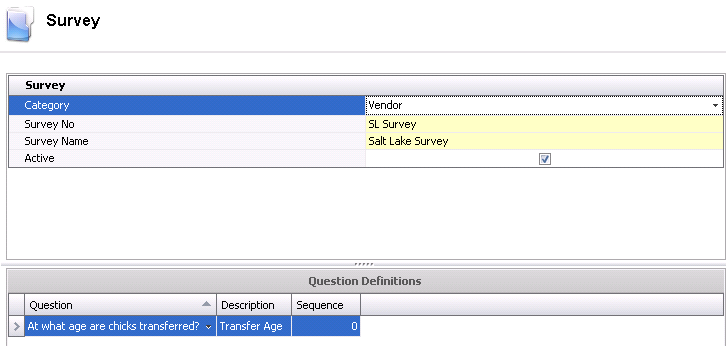
The Survey screen is used to create the survey and define the questions. The survey Questions must first be created before adding a new survey.
The Survey creation process contains the following components:
In Admin>Business>General>Definitions>Survey, select Survey.
Select  to
add a new survey record.
to
add a new survey record.
From the Category drop-down menu, select an option to define the type of survey. Available options are: Customer Feedback, Field Service, Grower or Vendor.
In the Survey No, enter a unique code to identify the survey.
In the Survey Name field, enter a description for the survey.
The Active flag will be selected by default. De-select the flag if the survey is no longer active.
Select the survey Question. Survey questions must be created beforehand in: Admin>Business>General>Definitions>Survey>Questions.
The survey question Description will default in.
Enter the Sequence for the question.
If numerous questions are required, click the
button to add any additional lines to the question
definitions section.
Click the  button to save
the survey before closing.
button to save
the survey before closing.