
Change Reason codes are used in purchase contracts and purchase orders to identify the reason that the contract or order is manually closed.
Table Name: ProteinPurchaseReasonCodeChange
Change Reasons are used in:
In Admin>Business>General>Definitions, select Change Reason.
Select  to
create a new change reason record.
to
create a new change reason record.
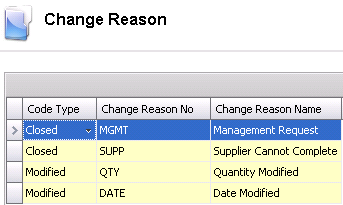
Select a Code Type. Options are: Modified if the purchase contract or order is changed, or Closed if the purchase contract or order is manually closed.
Enter a Reason Change No to identify the change code.
Enter a Reason Change Name to describe the change code.
Save and Close the record.